> This page location: PostgreSQL PHP > Query Data From PostgresQL using PDO
> Full Neon documentation index: https://neon.com/docs/llms.txt
# PostgreSQL PHP: Querying Data
**Summary**: in this tutorial, you will learn to query data from the PostgreSQL database in PHP using PDO.
## Querying all rows in a table
To query all rows from a table in the PostgreSQL database, you use the following steps:
1. First, [connect to the PostgreSQL database](https://neon.com/postgresql/postgresql-php/connect) by creating a new PDO object.
2. Second, call the `query()` method of the PDO object. The query() method accepts a [SELECT](../postgresql-tutorial/postgresql-select) statement as the argument. The query method returns a `PDOStatement` object.
3. Third, fetch the next rows from the result by calling the fetch() method of the PDOstatement object. The fetch_style argument of the `fetch()` method controls how the result returned. For example, the `PDO::FETCH_ASSOC` instructs the `fetch()` method to return the result set as an array indexed by column name.
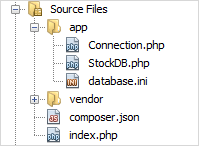
We will use the `stocks` table created in the [creating table tutorial](https://neon.com/postgresql/postgresql-php/create-tables) for the demonstration. Let's create a new class `StockDB` for storing all the methods that select data from the `stocks` table.
The following `all()` method selects all rows in the `stocks` table.
```php
/**
* Return all rows in the stocks table
* @return array
*/
public function all() {
$stmt = $this->pdo->query('SELECT id, symbol, company '
. 'FROM stocks '
. 'ORDER BY symbol');
$stocks = [];
while ($row = $stmt->fetch(\PDO::FETCH_ASSOC)) {
$stocks[] = [
'id' => $row['id'],
'symbol' => $row['symbol'],
'company' => $row['company']
];
}
return $stocks;
}
```
To test the `all()` method, we use the following code in the `index.php` file.
```php
connect();
//
$stockDB = new StockDB($pdo);
// get all stocks data
$stocks = $stockDB->all();
} catch (\PDOException $e) {
echo $e->getMessage();
}
?>
PostgreSQL PHP Querying Data Demo
Stock List
ID
Symbol
Company
```
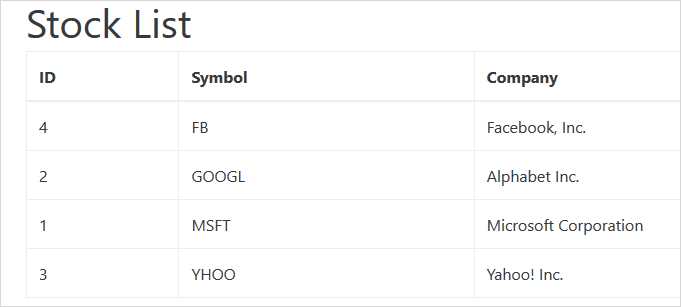
The first part of the index.php is to connect to the PostgreSQL database and get all rows in the stocks table. The second part shows the data in HTML format.
The following screenshot illustrates the output of the index.php file.
## Querying a specific row in a table
To query a specific row in a table, you use the following steps:
1. First, connect to the PostgreSQL database by creating a new PDO object.
2. Next, prepare the SELECT statement for execution by calling the `prepare()` method of the PDO object. The `prepare()` method returns an instance of the PDOStatement class.
3. Then, bind the values to the statement by using the `bindValue()` method.
4. After that, execute the SELECT statement by calling the `execute()` method of the PDOStatement object.
5. Finally, fetch the next row in the result using the `fetch()` method. If the SELECT statement returns 1 row, you can use the fetchObject() method to return an object.
The following `findByPK()` method selects a row in the stocks table based on a specified id and returns a Stock object.
```
/**
* Find stock by id
* @param int $id
* @return a stock object
*/
public function findByPK($id) {
// prepare SELECT statement
$stmt = $this->pdo->prepare('SELECT id, symbol, company
FROM stocks
WHERE id = :id');
// bind value to the :id parameter
$stmt->bindValue(':id', $id);
// execute the statement
$stmt->execute();
// return the result set as an object
return $stmt->fetchObject();
}
```
To test the `findByPK()` method, we create a new PHP file named `stock.php`.
```php
connect();
//
$stockDB = new StockDB($pdo);
// get all stocks data
$stock = $stockDB->findByPK(1);
var_dump($stock);
} catch (\PDOException $e) {
echo $e->getMessage();
}
```
Run the stock.php file, we get the following result.
```php
object(stdClass)[6]
public 'id' => int 1
public 'symbol' => string 'MSFT' (length=4)
public 'company' => string 'Microsoft Corporation' (length=21)
```
In this tutorial, you have learned various ways to query data from the tables in the PostgreSQL database using PHP PDO.
---
## Related docs (PostgreSQL PHP)
- [Connect to PostgreSQL Database Using PDO](https://neon.com/postgresql/postgresql-php/connect)
- [Create New Tables in PHP](https://neon.com/postgresql/postgresql-php/create-tables)
- [Insert Data Into Tables in PHP](https://neon.com/postgresql/postgresql-php/insert)
- [Update Data In a Table using PHP](https://neon.com/postgresql/postgresql-php/update)
- [Handle Transaction in PHP](https://neon.com/postgresql/postgresql-php/transaction)
- [Call PostgreSQL Stored Procedures in PHP](https://neon.com/postgresql/postgresql-php/call-stored-procedures)
- [Manage with BLOB in PHP](https://neon.com/postgresql/postgresql-php/postgresql-blob)
- [Delete Data From a Table in PHP](https://neon.com/postgresql/postgresql-php/delete)